
SCUM Aimbot Settings for Smoother Aim
Learn what the common SCUM aimbot options do and why moderate settings are usually the sensible choice.
People often assume an aimbot is a single switch. In practice most of them come with a handful of options and how you set those options matters more than the feature itself. Here is what the common ones do.
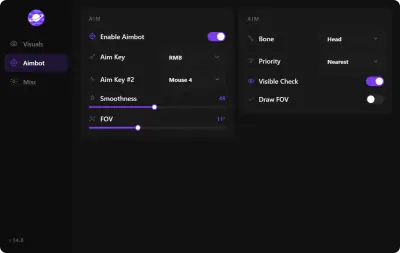
FOV controls how close a target has to be to your crosshair before the assist reacts. A small FOV means it only acts on targets you are already aiming near. A large FOV lets it grab targets from further across the screen. Smaller values feel more natural.
Smoothing slows the movement toward the target. Low smoothing snaps quickly. Higher smoothing looks more like a human hand adjusting. If you are playing around other people the smoother option draws less attention.
Some tools let you choose which part of a target to aim at. Others let you decide whether to prioritize the closest target to your crosshair or the closest in distance. Pick what fits your play style.
Having the assist on a key you hold rather than a setting that is always active gives you more control. You decide when it helps and when you want to aim by hand.
SCUM is not a pure twitch shooter. Ranges are often long and the weapons behave differently from a typical arena game. Extreme settings look odd in that context. A modest config is less likely to stand out and is easier to live with.
Aim assist breaks the rules of online play and can lead to account or hardware actions. Moderate settings may reduce how obvious it looks but they do not remove the risk.
Read about ESP in SCUM if you want to pair information with aim options. For the install steps follow the setup guide.